Mr. Turtle, aka Carl-bot
Carl-bot is our primary moderation bot.
Moderation actions, such as bans, mutes, and warns are all handled through this bot. We also use this bot for server logging.
| Prefix | Website |
|---|---|
? | https://carl.gg/ |
Commands
Mute and Unmute
?mute <user> [duration] [reason]
?unmute <user> [reason]
<user>can be a mention or user ID.- Duration must be added and is in the format of
2d,1h,10m, etc. - Reason is optional but should always be provided.
- Not specifying the duration mutes the user indefinitely but if the duration is specified then the user is automatically unmuted after the time is up.
Ban and Unban
?ban <user> [reason]
?ban <user> [duration of messages to purge] [reason]

?unban <user> [reason]
<user>can be a mention or user ID.- Reason is optional but should always be provided.
- Purging messages is optional and depends on the context. Messages should only get purged if they contain content that should not be kept in chat and the duration should reflect that.
- Adding
1after<user>deletes the user's messages for the past day but other values can also be specified like1h - If no value is specified next to the number then it automatically defaults to
d - Note that we can not purge the user's messages which are older than 7 days.
- The reason for unbanning a user needs to be the link of their Modmail thread which can be obtained by using
!loglinkin that thread.
Warn
?warn <user> [reason]

?clearwarn <user> <caseID>
<user>can be a mention or user ID.- Reason is optional but should always be provided.
- The
?clearwarncommand shouldn't need to be used regularly but its purpose is to remove a specific warning from a user. Note that it removes all past warnings if no case ID is specified. - Please note that the case ID is different than the message ID. See below for what the case ID is.
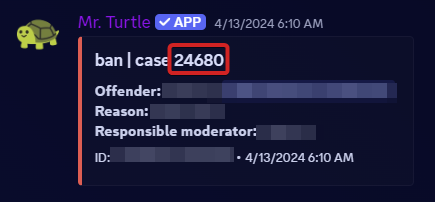
Kick and Tempban
?kick <user> [reason]

?tempban <user> [duration] [reason]
<user>can be a mention or user ID.- Duration must be added and is in the format of
1y,20d, etc. - Reason is optional but should always be provided.
Reason
?reason <caseID> [newreason]
- This command can be used to change a pre-existing reason or add one if you didn't before.
- Please note that the case ID is different than the message ID. See below for what the case ID is.
Modlogs
This command is used to check previous warns, mutes, bans etc for a user.
?modlogs <user>
Lockdown
This command is used to lock a particular channel.
?lockdown
?lockdown <channel>

?unlockdown
New Topic
!newtopic
This command is used to ask people to move on and start a new topic. Note that this is just an MEE6 command with a pre-defined snippet.
Topic Change
This is when you start a new topic. Continue to chat about the previous topic, and you risk being muted.
Mod Policy
?modpolicy
This is a Carl-bot snippet that details the policy around the sharing of moderation details in the server.
As a policy, we do not discuss moderation actions in public channels. If you have a concern regarding a moderation action that has directly affected you, we encourage you to open a @Marvel Modmail ticket. We do not comment on any actions regarding other users.
Please do not continue to discuss moderation actions in public channels.